Pages

Wednesday, June 21, 2023

Which One Doesn’t Belong

Reading Time: 1 minute


“Which one doesn’t belong?” is a critical thinking pedagogy where students are presented with 4 options and they are to propose which one is the odd one out, and give reasons for their selection. There is no one “right” answer. This pedagogy encourages divergent thinking, a thought process used to generate creative ideas by exploring many possible solutions. Some examples are shown below:


The Which one doesn’t belong pedagogy fosters divergent thinking which is important in nurturing creativity.


There is a whole website that is devoted to this critical thinking exercise, wodb.ca. As well as supplying pre-made WODB, you can submit your own to share. The site definitely has a maths focus, but this pedagogy can be used in any subject. 


Also you can but  “WOBD” into google image search, twitter or pinterest for premade ones or inspiration. Better still challenge your students to come up with their own which they then can pitch to the class - a fun homework challenge!


Wednesday, June 14, 2023

Strategies for Getting Students to Submit Work

(Estimated Reading 5 minutes)


Are you tired from chasing students for overdue work? Do you want to decrease the number of students who do not submit work? Here are some strategies I have found that work to increase submission rates.


I was teaching in a school that had ten classes per subject - I had one class, and I was chatting to another teacher that had two classes about submission rates of a particular task. I had three students that had not submitted by the due date, a 12% non-submission rate. The other teacher with two classes had the majority of the class not submit in both classes. He was running near 80% non-submission! Why was his submission rate so dismal? 


Communication of Expectations and Consequences


During our conversation he made statements like “I know what it is like when you are young, so many assignments to submit, work, sport etc” and “I wasn’t very diligent at submitting myself when I was their age.” He was being very empathetic to the students for their lack of submission - I suspect he may have been sending the students all the wrong signals!


Be clear with your discussions with students. These are the points I cover with my students at the time of setting the task:

  1. This is the due date. Make a sticky note on your desktop. Set an alert on your phone. Write it in your diary/phone/calendar. Do this now. Show me that you have done this.

  2.  If you think you have extenuating circumstances and won’t submit on time request extensions in writing via email/LMS message before the due date.

  3. I will contact your parents via phone if you do not submit.

  4. If you don’t submit I will help you <insert times and places> so i can help you with your work.

  5. Make sure students know your marking time frame - that non-submission holds up the return of work for the entire class. To not submit affects me and the rest of the class.


This sets the tone for the students, due dates are important, non submission is not an option - you will finish the work even if it is at recess/lunch/after school!


Mandate a plan/outline


Written work is often a stumbling block for students - where do I start? How will I know I am heading in the right direction? Uncertainty leads to procrastination. Most of my writing tasks have an inbuilt outline process which is done in class. With teacher feedback on their outline they have a clear direction for their assignment and they are less likely to get stuck. This process increases submission and decreases plagiarism. I wrote a previous blog post about outlines. 


Outlines mandatory done in class (open browser) dot points only hyperlinked to exemplar contains success criteria (rubric) feedback given before the next lesson   Benefits include   improves quality of final product improves submission rates gets students started helps students sequence their essays provides interim feedback

Unpack an Exemplar


Exemplars orient the students as to what success looks like. The critical part of an exemplar is that it is a SIMILAR task not THE task. I have seen teachers give exemplars of the same task which results in less confident students plagiarising the exemplar. Exemplars give students the confidence that they are on the right track.


Exemplars show the language features and structure of the genre. Annotations aid students further.


Use a hyperlinked template


A good template includes basic structure of the task and is hyperlinked to the task sheet and the exemplar. Having the basic structure in a document is a lot less daunting than starting with a blank document. Having hyperlinks to all the resources such as a task sheet and exemplars means the students don’t have to go hunting for them.


Email all parents (BCC)


I email parents for very important due dates. There is a significant proportion of students that forget school even exists once they take a step outside of the gates, and they only recall due dates when they are seated in class. Parents can be your greatest allies in submitting work!


Have clear checkpoints


Big tasks need to be broken down and it is useful for students to have interim deadlines for various parts of the task. You can set up an assignment template where the first page contains the checkpoints as shown in the example below. Students change the colours to indicate their progress or to request drafting.

For students that have missed interim deadlines a quick email home improves your chances of getting the work on the final due date.


Use Google Docs


I use Google Docs, specifically Doctopus which pushes out copies of the template. As I am the owner of the document students I can’t be shared out, the student can’t delete the document. If they claim their work has disappeared I can recover it using version history. But most importantly I can see their progress at any time and give feedback as the work is in progress. I check on the levels of completion just before the due date and send out an email to parents registering my concern.


Negotiate the due date with students for the whole class


When determining the due date, consult with your students. It may be that several other things are due on the same day. Students are more likely to meet a deadline when they have had input as to the timing.


Grade student work in a timely fashion


Imagine the students busting a gut to get work in on time, then the teacher takes 8 weeks to grade the work. It is unlikely that students won’t be as prompt with the next task if you still have the current one. Give an undertaking to the students about when they can expect the work returned to them - I will often negotiate this with the students at the same time as negotiating the due date. 


Focus on submission as a whole school


What happens in other classrooms does impact what happens in yours. In one school I was in, one particular faculty were notorious for their low expectations for submission. They often were marking multiple late tasks on the night of the report deadline. This makes it hard for students when teachers are inconsistent.


Trick students


Tell the students that the due date is on <due date> then change the submission date for the whole class. The initial due date creates a sense of urgency at the beginning of the task then the change in date makes the students feel like you are giving them extra time to polish their work. I say something like “I know the due date is tomorrow, Friday, but I won’t have time to mark them this weekend so I will be changing the submission time to Sunday night. Students super appreciate having extra unanticipated time. This also works when you have a number of students request extensions - it brings everyone in line. Use this judiciously.


TLDR: Too long, didn’t read -


Communicate clear expectations of submission and consequences of non-submission. Expect written extension requests.  Mandate a Plan/Outline Unpack an Exemplar Include Checkpoints Push out a Template  Negotiate Class Deadlines   Monitor progress using Google Docs

Are there any strategies that you have used that improve submission that have not been listed above?


Wednesday, May 31, 2023

Co-create Learning with Google Slides

(Estimated Reading Time: 3 minutes)


Shift the centre of learning from the teacher to the students with this collaborative learning pedagogy. Using this strategy develops 21st century skills of critical thinking, creativity, collaboration and communication. With the focus shifted to the students doing, this frees the teacher up to provide more assistance to students that need it.


How does it work?


This pedagogy takes co-creation into the digital age. A teacher prepares a Google Slides where each slide contains something different to research. The kind of things may be :


  • object/event to describe

  • concept to explain

  • word to define


I often will make an exemplar slide, so students understand the requirements of the task quickly. Allocate time to research (5-20 minutes dependent on the task) and 60 seconds to present.


Share the presentation with the class. If you have Google Workspace for Education at your school you need to share the presentation with the students’ Google Accounts. They will then be able to find the presentation in their Google Drive. If you don’t have Google Workspace you need to make the presentation editable by anyone and share the presentation link with the class via email or LMS. I think the easiest way to share links is by using a URL shortener, tinyURL is my new favourite, and it is free.


There is the potential for students to vandalise the presentation, they can delete slides, graffiti each others’ slides, change the background of all the slides, or just cause general mayhem. The most important step is to be explicit, tell the students they must:

  • work on their slide only

  • not edit anyone else’s slide

  • not change the background of the presentation (they can change their own background only)

I point out that if students behave poorly the collaborative presentation can be cancelled altogether. In my experience students are usually very well behaved, I have only ever had two classes that have been a bit tricky but I have always got there in the end.

An Exemplar


Students can turn


into this:


Positives of using this Pedagogy


Students can be terrified of public speaking and through multiple small presentation opportunities,  (presenting for no more than a minute) and presenting with a classmate, they can gradually overcome their anxiety. This will help them in the future in stressful situations such as job interviews and meetings.


Having choice means that students can select something that they are interested in. I always point out that you need to be quick to place your name on the slide you want - snooze you lose.


I can remember the bad old days of students presenting with Powerpoint, the amount of time wasted coming up to your computer, fumbling around with a usb, navigating to their presentation, waiting for it to load. At least a minute of class time for each presenter - you don’t need to be a mathematical genius to figure out that ten presentations means ten minutes lost, 25 presentations wastes 25 minutes or instruction time!


The benefits of using Google Slides are many

  • no time lost loading their presentation

  • students can work together on a slide

  • students can see other students slides and get ideas from them

  • teachers can monitor student work to provide feedback


The first time I did it I called it 60 Second Science, but this would work in geography, maths, english, history, HPE - any subject! I have used this student-focused pedagogy with year 8 to year 12 students, but I can see students in Primary also enjoying this pedagogy.


There is a bit of preparation involved to make the template, but using version history you can revert back to the original presentation and can be used year after year. 

Some of the collaborative presentations I have used


Presentation Title

Instructions

Some of the slides…

Researching Simple Machines

Find a slide… put your name on it. (1-2 slides.. you can make only one more)


1-2 students per slide


15-20 minutes to research and make your slide


60 seconds to present.


Archimedes screw, levers in the body, mousetrap, crossbow, mechanical jack, pneumatic jack, windlass, cam wheel, cheater bar, chisel, etc

Nerves and Hormones - What can go wrong?

SLIDE ONE How does your disorder affect the body? How is it diagnosed? What are the causes?

SLIDE TWO How can we innovate with biochemistry by creating drugs to mend, treat this disorder/disease?

Hashimoto’s disease, Addison’s disease, Grave’s disease,

Dwarfism, Acromegaly, Turner’s syndrome, Gestational diabetes, Kinfelters, Goitre, Androgen insensitivity, Nervous disease/disorder, Huntington’s disease, Parkinson’s disease,

Amyotrophic Lateral Sclerosis,

Myasthenia gravis, Spinal Cord injury, Sciatica, Epilepsy, Depression, ADHD


Collaborative learning with google slides is a Student-centred Pedagogy, that Builds critical thinking, creativity, collaboration  and communication.

What digital tools do you use for collaboration?

Wednesday, May 24, 2023

How I Helped My Students Ace Difficult Questions

(Estimated Reading Time: 1.5 minutes)

All teachers have their pain points - students struggle with <this>, students just can’t do <that>. By stepping back and focusing on the problem, trying something different, eventually most problems can be overcome. In this post I am going to explain how I overcame my students' struggle with osmosis questions in tests and exams. 


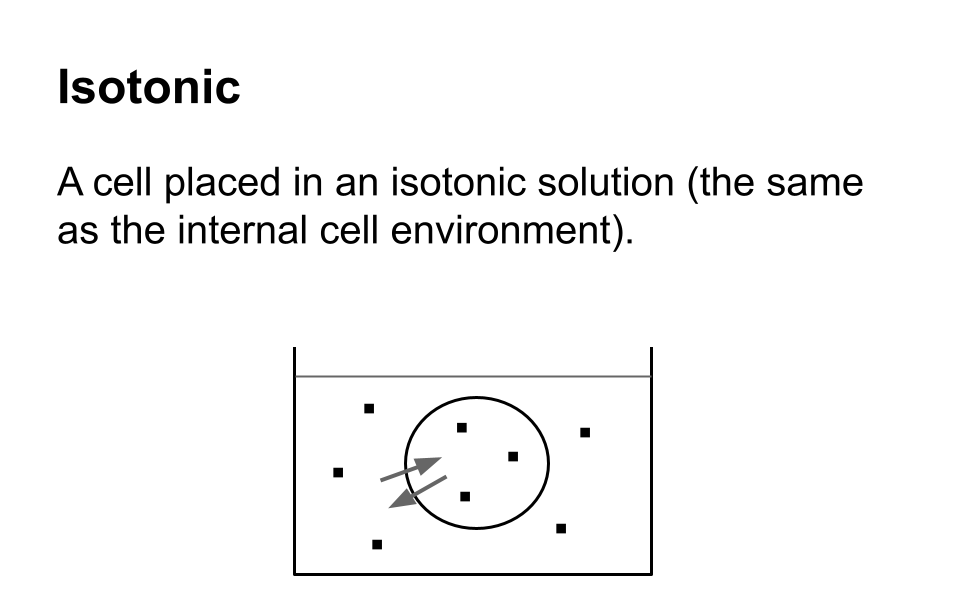
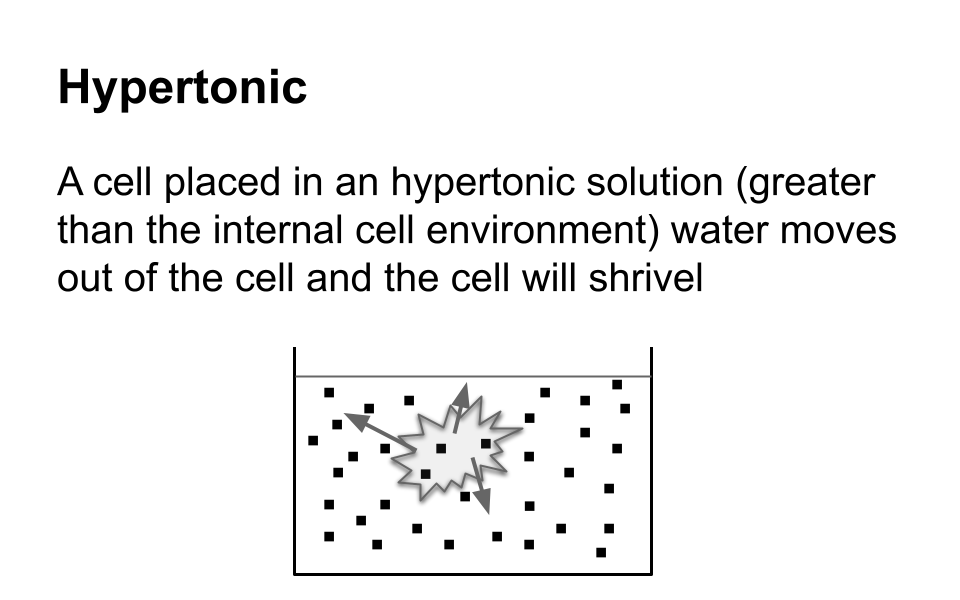
I realised that my Biology students struggled with conceptual questions, such as osmosis. Osmosis is the movement of water through a semipermeable membrane. 

There are three scenarios:


Students could learn these three scenarios, but when they tried to apply their knowledge to a new situation, they had great difficulty. I suspected that keeping the basic understanding of these three different situations in their working memory while at the same time trying to decode a new situation was too much to do in their heads. 


So I tried an experiment. I included this diagram as shown below in a formative mini-test (assessment for learning). 


Student results improved dramatically as they referred to the diagrams and applied them to the new situations in the questions. 


My next step was to train them to rote learn the diagram, first we used the look, cover, write, check method. Then at the beginning of each lesson the students had to try and reproduce the diagram from their memory. After a few lessons all students all had nailed this task. I sporadically sprung the task mid-lesson, just to make sure they had it.


When I handed out the summative test (assessment of learning) they were instructed at the beginning of the test to draw that diagram on their scrap paper. When they got to the difficult osmosis questions they were to refer back to the diagram as they had done in the formative test. The results in the osmosis questions were outstanding. My final step was to remind the students before the final year external exam to use the reading time in the exam to write their osmosis reference diagram on their scrap paper. 


What conceptual questions in your subject would benefit from this approach in reducing cognitive load? 


Wednesday, May 17, 2023

Timetables that Support Learning

(Estimated Reading Time: 1.5 minutes)


I have been in two schools that have changed the structure of their timetables. Both instances showed me that timetables can, and do, impact student learning and behaviour. I was in a school that restructured 250 minutes of instructional time. 


In the first year senior school subjects were allocated a single and two doubles. The following year this was changed to three singles and one double. This resulted in finishing my year 12 Physics course TWO WEEKS EARLIER. Thinking it may have just been me, I queried several other teachers. Similar results - they also finished earlier, one two weeks, the other 1.5 weeks.


Timetables that increase the frequency at which lessons occur increases the rate of learning.

Impact on Learning 


Shorter instructional blocks meant that the students’ attention spans were less stretched. The number of times I saw the students a week provided a greater opportunity to recap previously learned material, and the interval between learning exposures was less. Due to the higher levels of engagement in the shorter lessons I could move more quickly through the content. The research is clear - the more often you are exposed to learning, the more likely that information will be retained.


Other benefits include that if a student was absent for a day they would miss as much class time - loss in instructional time was spread over more subjects. Students that are challenged for attendance and attention, the second configuration is a no-brainer. 


You can only imagine how an extra two weeks (500 minutes) of instructional time at the end of the year impacted my students. Five hundred minutes for revision, practice exams, etc. I felt my students were more prepared and confident going into the final exams.


In summary, shorter, more frequent exposures increased the speed at which learning can occur. What are your thoughts on timetables? Can they impact learning, behaviour or motivation?


Wednesday, May 10, 2023

Rainbow Students

(Reading Time: 5 minutes)

Idahobbit (International Day Against Homophobia, Biphobia and Transphobia) is next Wednesday the 17th of May. In support "go rainbow to signal your stance against LGBTQIA+ discrimination."


I made this presentation for my staff to help them navigate LGBTIQ+ terminology and etiquette. I consulted several of the trans students at my school in creating this presentation, feel free to use it with your staff or classes:


Wednesday, May 3, 2023

Transform your Classroom with Intentional Strategies

 (Estimated Reading Time: 3 minutes)


Have you noticed over the years that managing classroom behaviour isn’t getting any easier? It’s time to up your game with these strategies... 


My role as a pedagogical coach was very diverse, and I was called on to assist teachers in many different ways. One reason I am asked for assistance is when a teacher is having issues with classroom management. 


How can teachers

  • minimise undesirable off-task behaviours?

  • maximise desirable on-task behaviours?


Most teachers have the answers, they just need the time and space to come up with their own solutions. The best behaviour management strategies occur well before there are problems, they require teachers to be proactive, intentional and explicit. Highly accomplished teachers do this so effortlessly that an observer may dismiss the calm in the class as “a good class”. 


I was called in to assist a pre-service teacher with classroom management strategies. The first step was to observe their class. The teacher was teaching a middle years science class, and after explaining the instructions of the science lab the teacher said “Okay kids - you can start the practical now.”


Kids pooled around the trolley, grabbing equipment. The vibe was definitely excited - but chaotic. It was evident that not all students had listened to the instructions. Some students were off task and disengaged. When all was done there was a trolley full of haphazardly replaced equipment, some sinks had paper towel and other debris in them, tables were not cleaned. The lab coat cupboard looked a mess, some lab coats were just thrown on the ground. The bell went and the students fled, leaving the lab in chaos. The teacher was increasingly frustrated during the lab and towards the end they were raising their voice to be heard.


In the debrief, the teacher was despairing - “They don’t listen, they are such a bad class!” The teacher had given no thought to how they wanted the students to behave before the class started, only after the crime. I asked

“How do you want the lab to look after the practical? Do you want everything put back on the trolley the way it came in?” 

“Yes.” 

“How could you ensure all students listened to the instructions and are working safely?”


We workshopped and rehearsed some strategies such as verbalising expectations. “Look at the trolley carefully, that is how I want it to be left when you pack up, exactly as you found it.” “I have checked all the sinks and they are clean, please make sure they are clean at the end of the lab, and wipe down the benches for the next class coming in.” A shift from “don’t do <this>” to “I would like to see <this> because...”


When the teacher was explaining the experiment they were to check if all students had a clear understanding. In starting the explanation the teacher was not to speak over the students to command attention, they were to use a non-verbal cue of being silent and raising their hand. The teacher was to just wait until all students were quiet and attending.  If a student stopped listening they were to stop talking and use their gaze as a non-verbal cue. The teacher was to wait until the student was back engaged. If that didn’t work, the teacher was to move closer to the student until they realised the class had stopped due to their talking.


Another strategy was to assign responsibilities to the students. The teacher rehearsed:

“In your lab group, appoint one person who is in charge of safety. Appoint one person to ensure all the steps are being followed. Appoint one person to be in charge of ensuring the bench is clean and everything put away neatly”. They also wrote these responsibilities on the board.


As the teacher was to move around the classroom they were to chat with the students to focus them on the learning intentions and success criteria, as well as ask questions to promote critical thinking. As for those pesky lab coats that needed to be folded and placed in the cupboard, two students were appointed lab coat managers, one for the folding and another for the placement in the cupboard.

We also looked at time management, making sure students had enough time to complete all the assigned tasks.


We also had a plan for what would happen if things started to go wrong. The teacher was to stop the class and reiterate any instructions or any new information that had been forgotten, employing wait time and checking for understanding. Most importantly the teacher was to remain calm and consistent. Every time a student strayed from the clear expectation the teacher was to be patient and understanding that every moment was a teachable moment, and that they were teaching the students how to conduct themselves as much as they were teaching them science.


I observed the next lab session and the flow of the lesson was radically different from the previous lesson I had observed. The teacher told the class what a great job they all did, they singled out the lab coat managers for their oversight of a difficult job. The teacher’s next step was to make sure that they continued the intentional approach. 


Intentional classroom management strategies include checking for understanding, Being intentional and explicit, Assign responsibilities to students, Verbally cue students for behavioural expectation, Be calm and consistent, Employ wait time, Use non-verbal cues.

What other strategies might you have suggested to the teacher? Have your say in the comments.

Wednesday, April 26, 2023

Mandating Outlines as Part of an Assessment

(Estimated reading time 2.5 minutes)

Quite some time ago ( >10 years) I was sent to a Professional Development day that featured John Hattie. Although I was not in agreement with everything he had to say, there were some takeaways that changed my practice, and one of those was the use of outlines.


In his list of effect sizes was: Making an outline before writing a paper, effect size .85. (that’s good :-)


Benefits of Outlines


It made sense to me - if students are forced to make an outline they think holistically about an essay/paper/assignment instead of obsessing over the first sentence or paragraph. They are more likely to sequence the information logically. It helps students who are usually paralysed by the thought of an assessment get started, which increases submission rates. Ensuring there is a cycle of feedback on the outline increases the quality of the final submission.


More importantly, in the event that the student does not submit the essay/paper you could assess the outline for elements such as discussion, analysis or evaluation, even though it is not a fully fledged essay they can often meet parts of the assessment and sometimes even scrape through with a C-. At worst they can usually meet a D which enhances their grade point average in comparison to an NA (Not Assessed).


Outlines mandatory done in class (open browser) dot points only hyperlinked to exemplar contains success criteria (rubric) feedback given before the next lesson   Benefits include   improves quality of final product improves submission rates gets students started helps students sequence their essays provides inter


The Process


This is an example of an outline. To prevent students from trying to write the entire essay I restrict them to a maximum of one page. Apart from the dot pointed structure of the outline, I include a rubric so students can reference the success criteria, I also include a hyperlink to an exemplar outline (an A example of a similar task). 


It is important to present the task in the lesson before the outline lesson, I give the students the task sheet and set research for homework. Most students get started on their research, some almost finish the outline, and yet others don’t do anything before class. 


Just before the class (usually a double lesson) I push out documents for the students to write in, via Google Docs. By using Google Docs I can monitor all the outlines as they evolve and see who needs assistance getting started. If any students have completed the outline before coming to class I can give feedback on it and grade it during the class, they can then get started on their essay.


By monitoring the folder in my Google Drive I can order student work by “last modified”. By seeing that Johnny hasn’t edited for the last 15 minutes is very effective at identifying students that are stuck.


By monitoring the google folder you can see when students have last modified their document.


Through the use of Google Docs not only can you have greater support and supervision of student work, but it can also be used as a tool to detect plagiarism. If plagiarism is suspected, the Chrome extension Draftback can be used. It can play back the version history of any Google Doc as a condensed video, this shows edits and detects slabs of text flying in. I have used this tool before and it can provide the proof you need to establish plagiarism. Outlines and apps like Draftback are probably even more important in the era of websites that can automatically paraphrase (e.g. https://www.paraphraser.io/) and AI tools like ChatGPT. Usually if you advise students that you have access to this tool they are less likely to plagiarise in the first place.